Smart Planner
Plan, standardize, and launch campaigns without the back-and-forth.
- Role
- Research, requirements, design, rollout
- Status
- Shipped, in production
- Impact
- Campaign setup from 8 hours to 15 minutes
- Integrations
- Salesforce, Marketo, Coupa, Tableau
Overview
- Purpose
- Develop a campaign planning automation solution that centralizes planning, standardizes processes, automates campaign creation, and integrates financial tracking, improving efficiency and visibility across the organization.
- Deployment
- Built and deployed for a live B2B SaaS marketing organization. Campaign planning, budget tracking, and Salesforce and Marketo automation running in production across the marketing org. Subsequently commercialized and sold to external customers through Next Generation Platform Solutions.
- My role
- Assessed existing market solutions to identify the optimal approach, developed preliminary design and requirements, assisted with end-to-end product development and implementation, trained marketing teams to drive adoption, and led continued system evolution by identifying and resolving customer requests and pain points.
Context
B2B organizations face real challenges in planning and budgeting. Fragmented tools and manual processes create unstandardized data and inefficiency, making it hard to align strategy across departments and see actual spend against plan. On top of that, the back-and-forth between marketers and marketing ops to create Salesforce campaigns and Marketo programs consumes time and resources.
Teams are turning to automation to fix this, and 56% of companies already use marketing automation tools. But existing solutions often lack the customization and integrations that unique workflows need, and their cost can be prohibitive. So we built Smart Planner.
- Target audience
- B2B marketers, B2B finance teams
Problem statement
B2B marketing teams grapple with fragmented planning and budgeting, leading to inefficiency, inconsistent data, and misalignment across departments. That's compounded by the manual back-and-forth between marketers and operations to create and manage campaigns in Salesforce and Marketo.
KPI goals
- Time saved in campaign creation. At least 1 hour per day
- User adoption. 70% or more of the marketing organization
- Manual errors. 50% or greater reduction
- Budget adherence. 30% fewer errors
Approach
Evaluation of existing solutions
We explored available systems through product demos and conversations with industry peers facing similar challenges. Feedback indicated many solutions were limited in scope or didn't deliver on their promises, and the costs (service fees, enhancements, integrations) were prohibitively high.
What internal interviews revealed
- Siloed planning. Each department planned in its own Google Sheets, with no standard formats or inputs, requiring time-consuming consolidation and cleanup.
- Limited visibility. With no central repository, marketers couldn't see or understand each other's plans.
- Inefficient campaign creation. Marketers planned in Sheets, then filed unstandardized tickets for Salesforce and Marketo setup, causing constant back-and-forth and delays.
- No financial integration. The workflow didn't connect to Coupa, the purchase order system, so linking campaigns to POs needed extra help from ops and finance.
- Poor ROI visibility. Without campaigns tied to POs, measuring return on investment was difficult.
- Overall frustration. The manual process created real frustration and a clear need for automation.
Strategy
Vision: to transform B2B marketing planning by creating a centralized, automated platform that enhances efficiency, standardization, and collaboration across the organization.
- Integration. Seamless connections with Salesforce, Marketo, and Coupa for unified data.
- User experience. An intuitive interface that makes planning effortless.
- Customization. Flexible views and reports for different roles and departments.
- Financial tracking. Purchase orders linked directly to campaigns for accurate budget management.
Solution
- Scalable architecture. API integrations with Salesforce, Marketo, and Coupa, designed to support more platforms later.
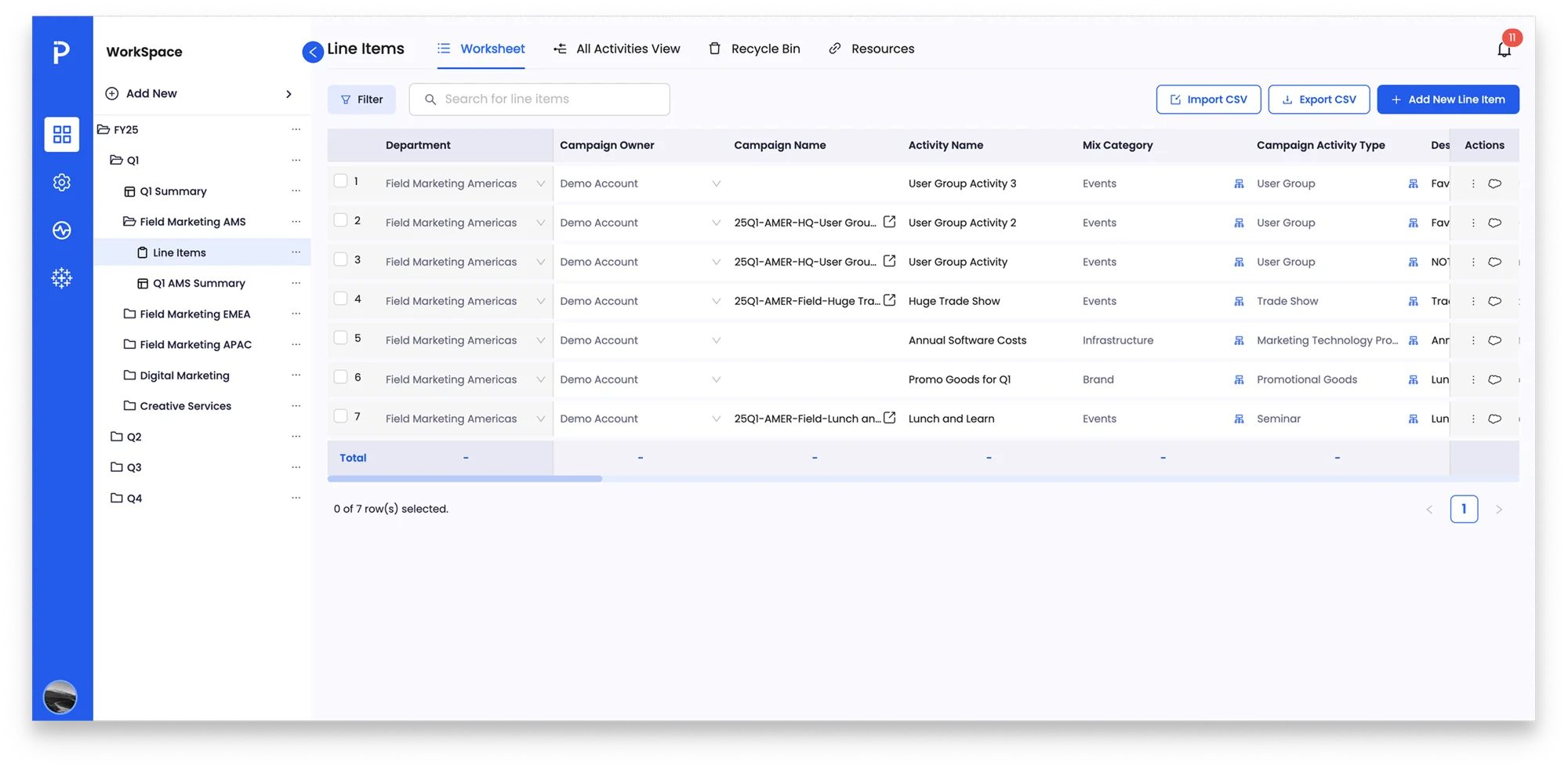
- Synced data model. Essential fields from Salesforce's Campaign object are mapped and stored centrally, so budget lines use consistent values and admins manage every field in one place.
- One-click campaign creation. Predefined mappings between campaign types and cloneable Marketo programs let users create Salesforce campaigns and Marketo programs with a single click.
- Connected to Calendar Cloud. Anything created in Smart Planner automatically appears on Calendar Cloud.
- Spreadsheet-inspired interface. Picklists, custom fields, filtering, and mass cloning across quarters made the move from Google Sheets feel familiar.
- Reporting. Budget roll-up reports give organizational visibility, and Coupa PO linking enables detailed spend analysis.
Challenges and iterations
- A spreadsheet UI at scale. Drag-and-drop rows and columns worked at 10 to 20 rows but slowed at thousands. Data virtualization and optimized rendering helped, and performance with very large datasets is an ongoing effort.
- Coupa API limitations. Required Coupa fields didn't align with Smart Planner's data structures. We shipped a semi-automated flow: campaigns sync to Coupa automatically, and users create the PO manually with campaign data already linked.
- Reporting on actual spend. Financial data from Coupa was consolidated in a data warehouse, enriched with Smart Planner and Sheets data, and visualized in Tableau for the MVP, with deeper finance collaboration planned.
Results and learnings
Campaign creation time
Reduced from up to 8 hours to about 15 minutes
Goal: Save at least 1 hour per day
User adoption
90% adoption, helped by retiring legacy systems and strong leadership support
Goal: 70% of the marketing organization
Manual errors
Standardized entry and automation virtually eliminated manual errors
Goal: 50% reduction
Budget adherence
At least 30% improvement in budget management and accountability
Goal: 30% improvement
Lessons learned
- Prioritize user-centric design. Involving end users throughout led to higher satisfaction and adoption.
- Ensure scalability. Early architecture choices made multiple integrations and growing data volumes manageable.
- Adapt to external constraints. Coupa's API limits showed the value of flexible solutions and proactive vendor communication.
- Keep collaborating. Ongoing work with finance and marketing ops was essential to getting reporting and budget adherence right.