Calendar Cloud
Unify your data, simplify your schedule.
- Role
- Research, requirements, design, rollout
- Status
- Shipped, in production at two public companies
- Users
- 200+ person global marketing team
- Integrations
- Salesforce, Marketo, Asana
Overview
- Purpose
- Develop a centralized calendaring solution that integrates and visualizes all marketing activities, emails, and projects, providing an automated and unified source of truth.
- Deployment
- Built and deployed across two publicly traded enterprise organizations: a B2B cybersecurity company with a 200+ person global marketing team, and an enterprise cloud infrastructure company. Running in production as the primary marketing calendar for both. Subsequently commercialized and sold to external customers through Next Generation Platform Solutions.
- My role
- Assessed existing market solutions to identify the optimal approach, developed preliminary design and requirements, assisted with end-to-end product development and implementation, trained marketing teams to drive adoption, and led continued system evolution by identifying and resolving customer requests and pain points.
Context
Professionals often juggle multiple calendars and data sources, leading to fragmented schedules, incomplete data, and decreased productivity. Our team set out to build a unified calendaring platform that integrates various data streams into a single, cohesive calendar, automating data input, improving operational efficiency, and giving users a central hub for everything on their schedule. With limited solutions on the market, and roughly 98% of B2B marketers recognizing the benefits of automation, we decided to custom-build a solution.
- Target audience
- B2B marketers
Problem statement
Marketing teams struggled to visualize and coordinate campaigns because their calendaring tools lacked integration with Salesforce, Marketo, and Asana data. The result was marketing silos, weak collaboration, and missed opportunities. Fixing this would improve campaign coordination and increase marketing productivity.
KPI goals
- Campaign coordination. User satisfaction ratings of 80% or higher
- Marketing productivity. At least 1 hour saved per day
Strategy
Vision: to revolutionize marketing by providing a centralized, automated calendaring solution that enhances efficiency, standardization, and collaboration across the organization.
- Integration. Robust integrations with Salesforce, Marketo, and Asana to automatically capture and sync marketing activities into a unified data repository.
- Customization. Filters and personalized calendar views showing data relevant to each person's role.
- Interoperability. Export activities to Google Calendar, Apple Calendar, and Microsoft Outlook.
- Collaboration. Share customized views with teammates and create global organizational calendars.
Approach
Our primary objective was to assess the availability of existing calendaring solutions and understand the specific challenges faced by our internal marketing team.
- Market analysis
- We evaluated third-party calendaring solutions through demos from providers across the category. The analysis revealed a significant gap between what existing products offered and what our organization needed, leading us to build a custom solution.
What internal user interviews revealed
- Manual entry inefficiencies. After creating Salesforce campaigns, marketers manually entered each activity into their personal calendars, about ten minutes per entry and at least two hours per day.
- Inconsistent data entry. No standardized fields meant inconsistent calendar entries that hindered comprehension and coordination.
- Fragmented calendaring. Marketers built their own groups in their own calendar apps. With no central master calendar, scheduling was disjointed.
- Siloed tracking tools. Marketo email and Asana project schedules lived separately, and consolidating them required help from marketing ops, sometimes taking hours.
- Global visibility gaps. Without a unified view, teams unknowingly engaged the same customers and prospects repeatedly.
Solution
- Flexible backend. A scalable API integration pattern connected Salesforce, Marketo, and Asana, ensuring clean data flow and a responsive experience.
- Read, don't store. Calendar Cloud reads data from source systems in real time instead of storing it locally, cutting storage costs and improving accuracy.
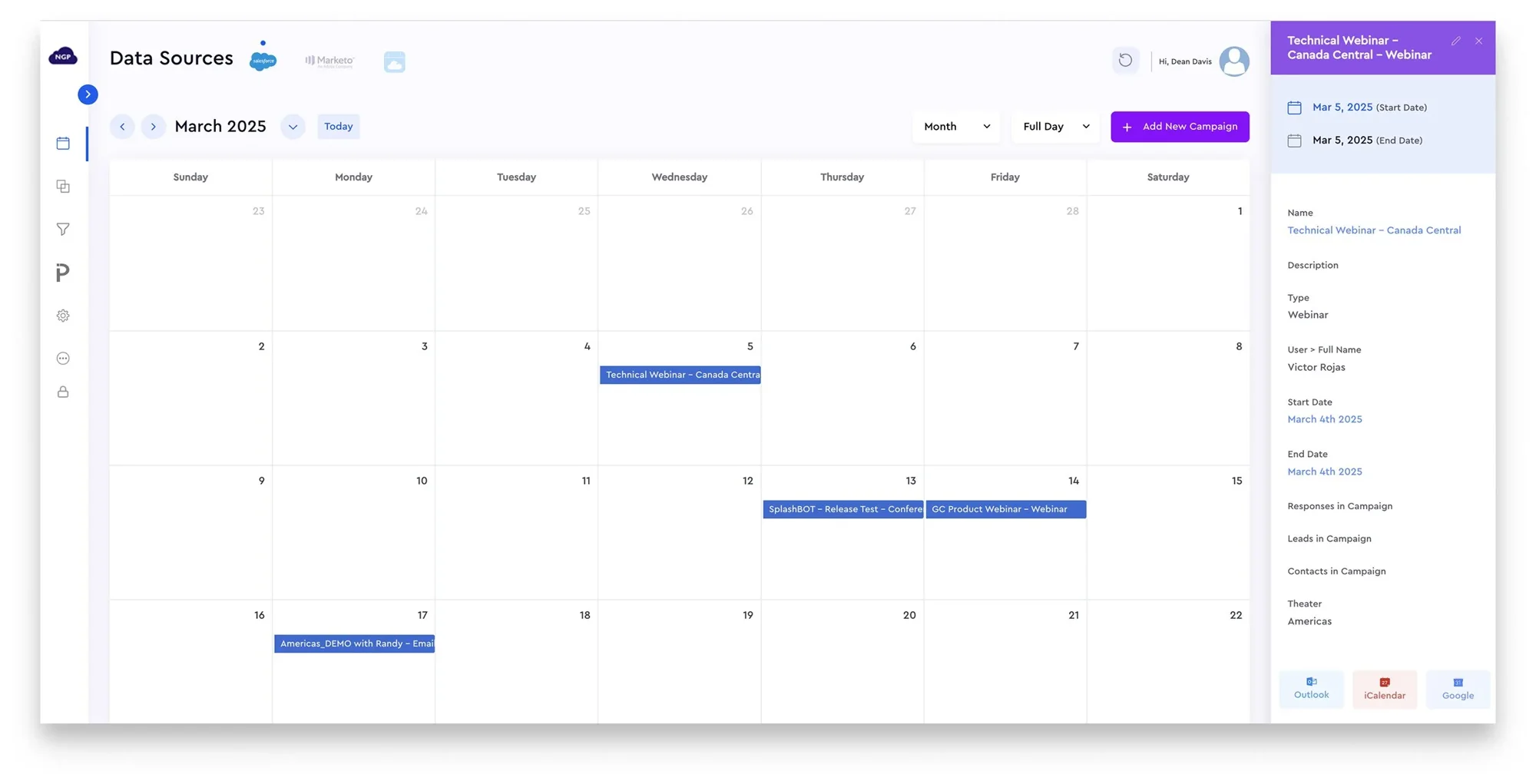
- Data source tabs. Toggle tabs let users switch between Salesforce, Marketo, and Asana data.
- Filtering. Robust filters let users tailor views to the criteria that matter to them.
- Activity tooltips. Hover tooltips show names and details instantly, especially useful on busy days.
- Detailed activity view. An expandable panel shows every data point, with admins configuring visible fields from a console.
- Export and sharing. Export to Google, Apple, and Outlook calendars, and share custom views with colleagues inside and outside the company.
Challenges and iterations
- Integrating multiple data sources. One combined view was overwhelmed by data volume and filter complexity. Tabbed navigation kept the unified calendar experience while giving each source clear segmentation.
- External sharing. Access originally required company Salesforce credentials. We built a workaround that allowed non-employee access, so marketers could coordinate with outside partners.
- Ongoing iteration. Select power users tested features in a sandbox throughout the build, and continuous feedback continues to shape enhancements.
Results and learnings
User satisfaction
90% satisfaction in an internal survey of 200+ users
Goal: 80% or higher
Time saved
At least 1.5 hours saved daily by eliminating manual data aggregation
Goal: 1 hour per day
- Trust and engagement. Reliability led users to request more functionality.
- Organizational alignment. Marketers moved from isolated calendars to one central system, reducing redundant efforts.
- Standardized data. Standardized inputs and processes improved data quality and made filtering and integration reliable across the organization.
Lessons learned
- Gather requirements thoroughly, early. Detailed requirements up front would have reduced revisions during testing.
- Involve users sooner. More power users and testers early would have sped up enablement and adoption.
- Plan for the complexity of building from scratch. Turning a concept into a working product taught us a lot about teamwork, problem-solving, and adaptability.